
1. recording tickets directly in the plan
Our mobile application offers the option of entering tickets directly in the plan. To do this, open the relevant plan directly in the project, click on the button with the plus sign on the right and place the new ticket directly on the plan. You can then enter the detailed data and assign the activity to the responsible service provider group.
The benefits to you: Fast ticket entry during the construction meeting, immediate notification of plan changes and simple documentation of defects!

2. release of construction diaries
Construction diaries change during recording, additional items are often added during the course of the day and completed items can be removed. At the end of the day, you want to forward the current status to your team and keep an audit-proof record of the status. The “Release day” function in our KENEXOS(R) construction diary is designed for this purpose. You select the layout and decide whether you want to forward all ticket details or just an overview of the open points.
Your advantages: Your recorded data is added to the construction diary as an audit-proof PDF. Your entire team is informed of the released construction diary by e-mail and automatically receives a hyperlink to your release file. Of course, only authorized project members will then have access to your approved construction diary.
Tip: You can repeat the approval process at any time if you want to make changes later. KENEXOS(R) automatically saves each approval status and informs all team members of changes by e-mail.

3. copy & paste file attachments from the clipboard
Add screenshots in our web application directly from the clipboard as a file attachment. You don’t have to save them first and then attach them as a file. Simple, quick capture!

4. direct access to the ticket monitor from the dashboard
Our project overview in the KENEXOS(R) dashboard is actively designed. By clicking on the ticket status below the project name, you can switch to the ticket monitor and view the tickets in the corresponding status.

5. saving filters and displaying them in the dashboard
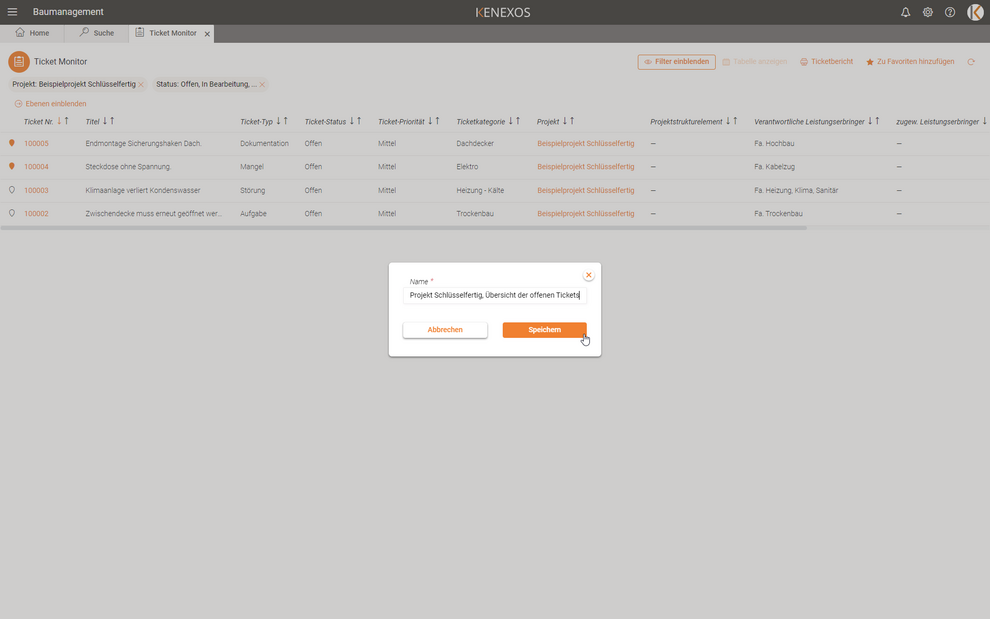
Would you like to quickly access the tickets for your projects from the dashboard without having to create a new search filter every time? Then use the “Add to favorites” function in the ticket monitor. Once set, you can save your search filter and KENEXOS(R) will display it as a shortcut in the dashboard.
Click and immediately receive the current overview of your tickets – it couldn’t be easier, could it?